PART 3: Server-Side Data Fetching with NextJS
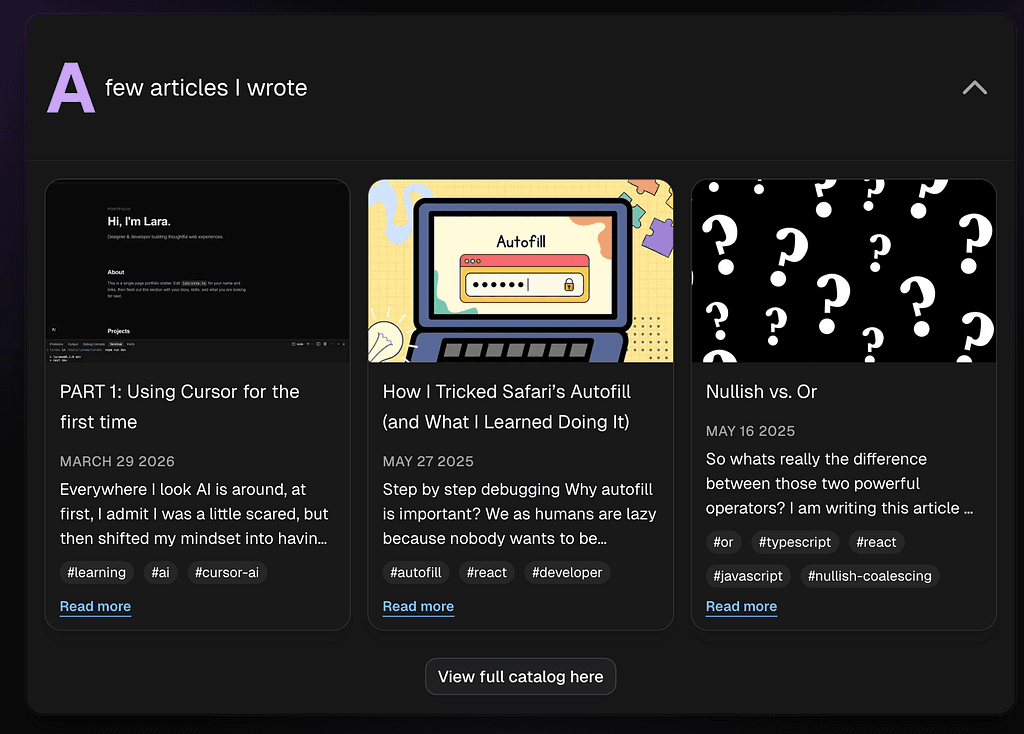
So far, my content for my portfolio has been stored statically in a TypeScript file . While this works for small projects, it doesn’t scale well and requires manual updates. I want to make the application smarter by fetching content dynamically from a backend. I initially considered generating all the content for my website by relying on LinkedIn’s API. However, after discussing with Cursor in ask mode, I have realized its not a common or practical approach 💡. The LinkedIn API is not designed for this type of usage, it’s restricted, requires OAuth, and access to certain data depends on permissions that need to be explicitly approved Given that most of my website content is relatively static, maintaining it manually isn’t a major drawback. However, one section that does benefit from being dynamic is my articles. I publish a few articles per year and didn’t want to manually maintain titles, images, and formatting each time 🤔 Before diving in, I asked Cursor to analyze a few data fetching strategies Fetch Standard browser Web API for HTTP requests Fetch on the client (inside of a file with `use client` and inside a useEffect) User driven, mainly after an interaction you may use browser APIs like localStorage loading state will need to be handled as data arrives after the first paint Fetch on the server HTML can be rendered on the server with the data already inside No loading spinner necessary in that case SEO friendly Caching strategy Then I found out, I should also be thinking about what caching strategy I’d like to implement: 1️⃣ S erver S ide R endering (SSR) By default, Next.js caches requests but you can opt out with cache: 'no-store' to always fetch fresh data fetch(url, { next: { cache: 'no-store' } }) No caching → always fresh 2️⃣ S tatic S ite G eneration (SSG) One snapshot at build time hence STATIC Recall: fetch is cached by default so if you don’t specify any cache configs, it becomes build time static. But you can explicitly mention it for clarity: fetch(url, { next: { cache: 'force-cache' } }) 3️⃣ I ncremental S tatic R egeneration (ISR) mostly static data but cache will refresh after a set period of time fetch(url, { next: { revalidate: 3600 } }) // 1h You can also do export const revalidate = 3600 in the page level and it will apply ISR to everything in the route, so all fetch calls will inherit this config unless directly overridden! ⚠️ Note we can also use tag based cache revalidation, but my website is too simple for this! I still asked Cursor about this advanced topic. Imagine we have an Ecommerce website with a product list. You can tag that data when you fetch it like so: // Dashboard.tsx fetch(url, { next: { tags: ["products"] } }) Later, if an admin updates the product list, you can refresh the tagged data by using the following method: // AdminDashboard.tsx import { revalidateTag } from "next/cache" revalidateTag("products") So when should I use what? Use SSG (static site generation): content is stable and doesn’t change much like blog posts, marketing pages, documentation Use ISR (incremental static regeneration): content changes occasionally but not constantly like product listings or when a timed update is needed Use SSR (server side rendering): content that depends on instant accuracy like live dashboard, real-time chats Important FYI on ISR NextJS uses stale-while-revalidate strategy which means no one will be blocked waiting UserA → sees page at T=0 1h passed T=3600 User B comes to the website at T=3601, will still see old page. Cache is now stale NextJS triggers regeneration in the background because it has been 1h, and no one is blocked waiting Regeneration is done, cache is updated T=3602 User C will see fresh content at T=3603 If you’ve made it this far, you’re probably thinking: “Alright, but when do we actually start building this?” Before diving into implementation, I took a step back to research using Cursor’s ask mode about different data fetching strategies and define my requirements. As mentioned in previous articles: providing clear context and precise instructions makes a huge difference in the quality of the results when working with AI. After this research, to make my article fetching dynamic I realized I need to fetch my articles from Medium using an RSS feed. For my implementation, the recommended approach was to fetch the RSS feed on the server rather than the client. Using client-side fetching (e.g., useEffect) would introduce unnecessary loading states and negatively impact SEO. Since the content doesn’t need to be real-time, server-side fetching with caching provides a much better user experience. Here is my query for plan mode in Cursor: goal: I want to fetch my most recent articles from Medium using its RSS feed instead of storing them statically in my @portfolioContent.tsx file assumptions: my user name is @laramo on medium RSS endpoint: https://medium.com/feed/@laramo requirements: - Use ISR for caching (suggest a good revalidation time) - Parse the RSS XML response into structured JSON (use rss-parser) - Map the data to match my article type (title, link, date, description, image, categories) found here @portfolioContent.tsx (23-32) - Limit to showing the latest 3 articles - Have a centered button bellow the 3 articles to `View full catalog here` which will redirect the user to my medium home page - Extract the image from content:encoded HTML, not just description questions: Recommend a good revalidate value given I post rarely (once every 1–2 months) let me know if you need to validate anything with me Cursor has built a very good plan. I tweaked it a little bit based on my needs. An example of tweaking was to use consts like SEVEN_DAYS_IN_SECONDS = 85500 instead of plain 85500 for example. Key takeaways from the implementation since now we are fetching images remotely, we need to allow next/image to optimize those images with the following config: const nextConfig: NextConfig = { images: { remotePatterns: [ { protocol: "https", hostname: "miro.medium.com", pathname: "/**", }, { protocol: "https", hostname: "cdn-images-1.medium.com", pathname: "/**", }, ], }, a new dependency rss-parser was installed to parse XML from RSS feed into a JSON object with the following fields export type Article = { title: string; /** English display date from the feed (e.g. `May 16 2026`). */ publishedAt: string; previewText: string; imageSrc: string; imageAlt: string; href: string; tags: string[]; }; a new server module lib/mediumArticles.ts was created and it fetches via ISR to revalidate the cache every 7 days. The mapping happens in this file const response = await fetch(MEDIUM_FEED_URL, { next: { revalidate: SEVEN_DAYS_IN_SECONDS }, }); Page is now an async component as it has to wait for articles to be fetched export default async function Home() { const { header, hero, intro, skills, work } = portfolioContent; const entries = await getMediumArticleEntries(); const articles = { ...articlesSectionMeta, entries }; ... <PortfolioAccordionSections sections={{ intro, skills, work, articles }} /> 👉 You can view the full code here Result: Bonus things I have read about on how to handle data Route Handlers are custom request handlers used to create API endpoints for a given route // is inside of app/api/hello/route.ts export async function GET(request: Request) { return Response.json({ message: 'Hello from Next.js!' }) } Necessary for external clients or when you need explicit control over the HTTP response (ex: setting custom headers or status codes) It was a bit of an overkill for my goal but I could have created a route /api/medium that returns a JSON object with the response, caching is in one place and provides easier testing Server Actions: Best for internal data mutations and form submissions directly within your React components. Summary You can use fetch on the server by default or on the client with useEffect when you need browser only functionality like a form or you need live behavior. You may choose the caching method that better suits your needs. Use Server Actions for writes (mutations). Use Route Handlers when you need a real HTTP API or web hooks. In my case, for Medium RSS → server fetch + revalidate the cache every 7 days is the natural fit. Next time, Ill be talking about how Cursor has helped me further understand some important concepts in NextJS, React and shadcn! — Until next time, LaraMo
- #portfolio
- #fetch-api
- #cursor
- #nextjs